Published
25 MIN READ
AI video ad: step-by-step process and costs
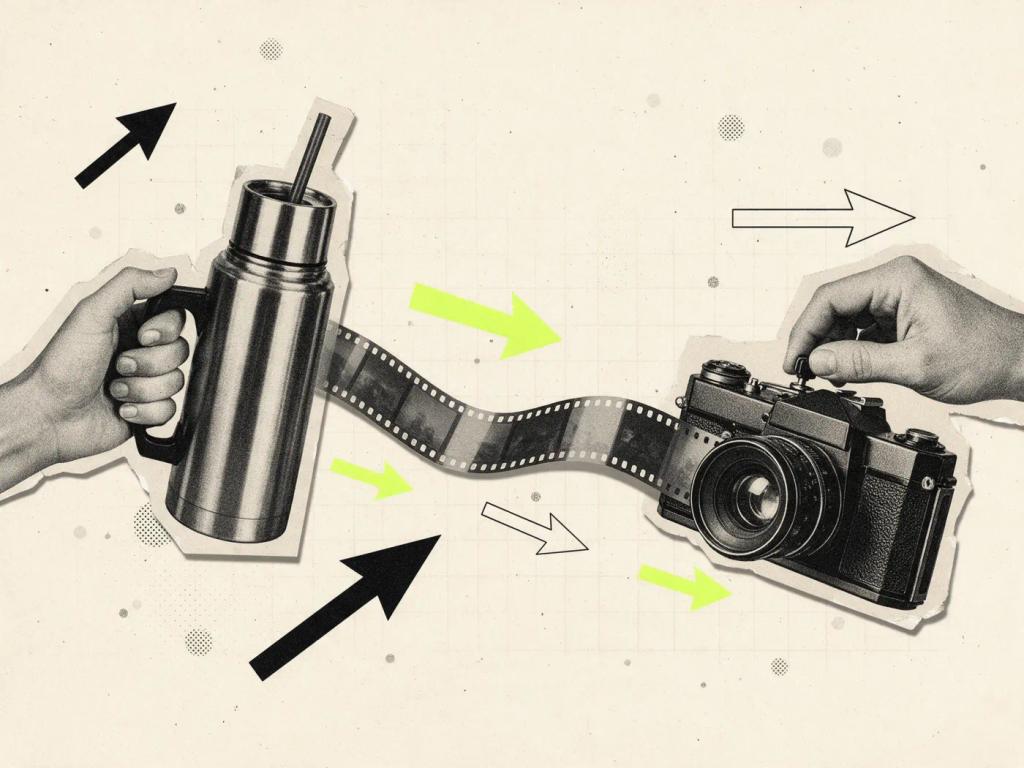

An AI video ad comes out of a chain of five tools: a 3D model of the product, a visual reference, a base image generated and corrected in ChatGPT, animation in Seedance 2.5 inside Higgsfield, and an upscale to 4K. In this article I walk through the Stanley Time video step by step, with the prompts, screenshots and the cost of each stage.
The video was posted on my Instagram profile, @henriquesaas, and this is the first article in a series that opens up the prompts behind each post. It is a study piece, with no ties to the Stanley brand. The goal was to measure how far one person, with no set, no model and no production company, can take a commercial.
Before the list of steps, an honest warning: no stage worked on the first try. The tumbler came out too small, the model grew extra legs and one video take was thrown out. The process below includes the mistakes, because they are the part nobody shows and the part that teaches the most.
What is an AI video ad and what does it take?
An AI video ad is a piece of marketing in which the product, setting, model and motion are generated or rebuilt by artificial intelligence models, from references and prompts written by a person. It takes the same things a traditional commercial takes before the camera rolls: art direction, framing decisions and the judgment to approve or discard. What changes is the cost of each attempt.
For Stanley Time, the chain was this, in order:
A 3D model of the tumbler in Blender, built by GPT-6 Astra from a prompt.
A hunt on Pinterest for a composition and typography reference.
A base image generated in ChatGPT and corrected in rounds until color, scale and anatomy were right.
Animation of the image in Seedance 2.5, inside Higgsfield, with a long prompt about physics and camera.
An upscale to 4K with Topaz Video, also in Higgsfield.
Each stage has its own section below, with a screenshot of what happened and the prompt that produced that result. At the end, a table sums up what each tool consumed.
Step 1: the product in 3D in Blender with GPT-6 Astra
The tumbler started as a 3D object, not a photo. The reason is control: with the product modeled, the color, handle, lid and straw are locked, and every image generated afterward has a solid reference to respect. Stock photos don't give you that control, and the exact color had to be my decision, not something I stumbled on.
The model was built by GPT-6 Astra, the OpenAI model released on September 3, 2026 that, according to Decrypt's review published on September 6, 2026, operates desktop apps by controlling the mouse and keyboard instead of returning a list of instructions. In practice, it took the prompt and assembled the tumbler inside Blender: geometry, materials and an editable scene. I reviewed the proportions and adjusted the render.
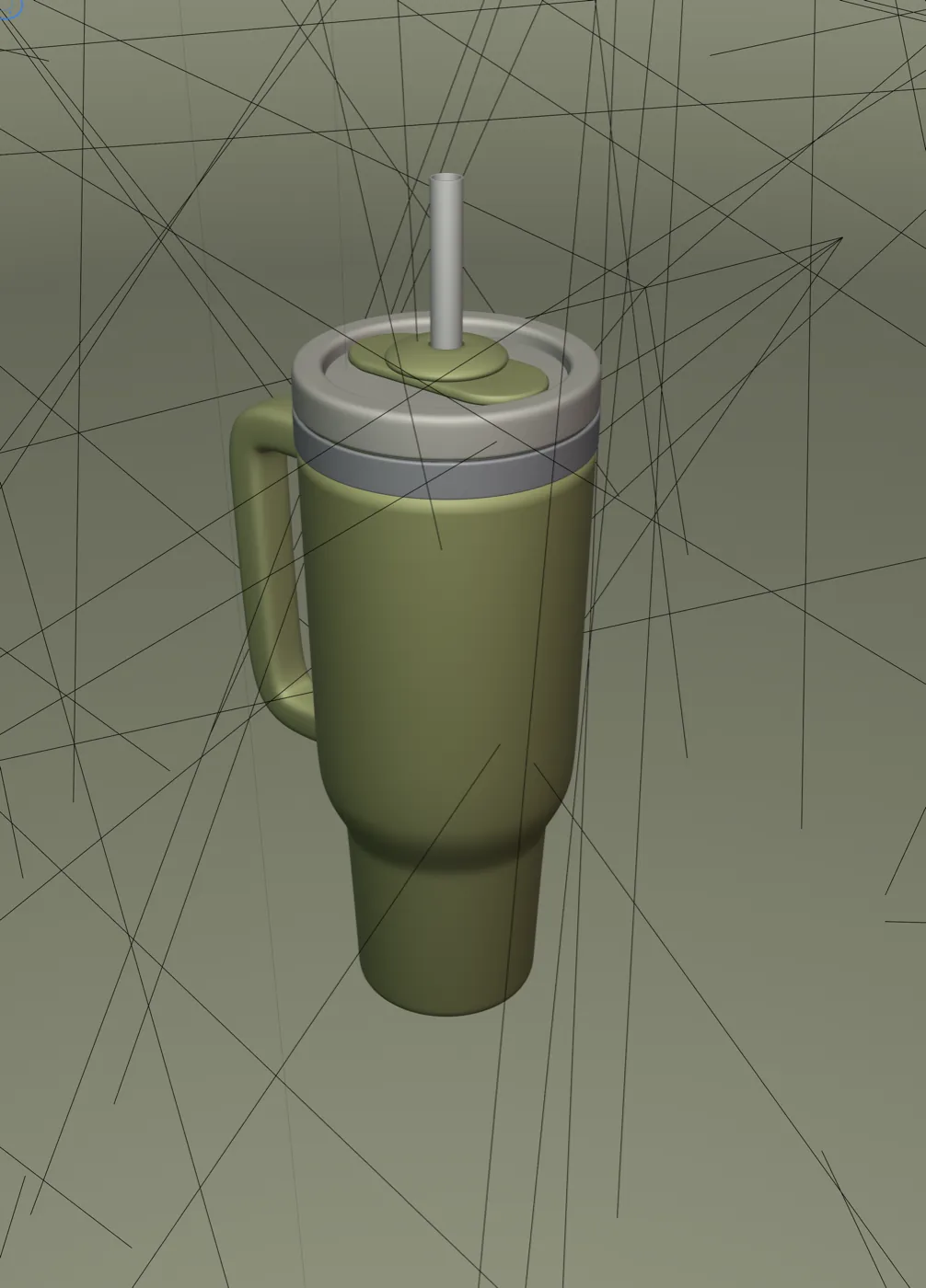
The text that drives this stage is the Astra prompt for Blender, which Wama is releasing for free in its own article. Cost of this stage: about 11% of the monthly quota on my ChatGPT Pro plan. It is by far the most expensive stage in model usage, and that makes sense: it is many back-and-forth rounds of an agent operating software, not a text reply.
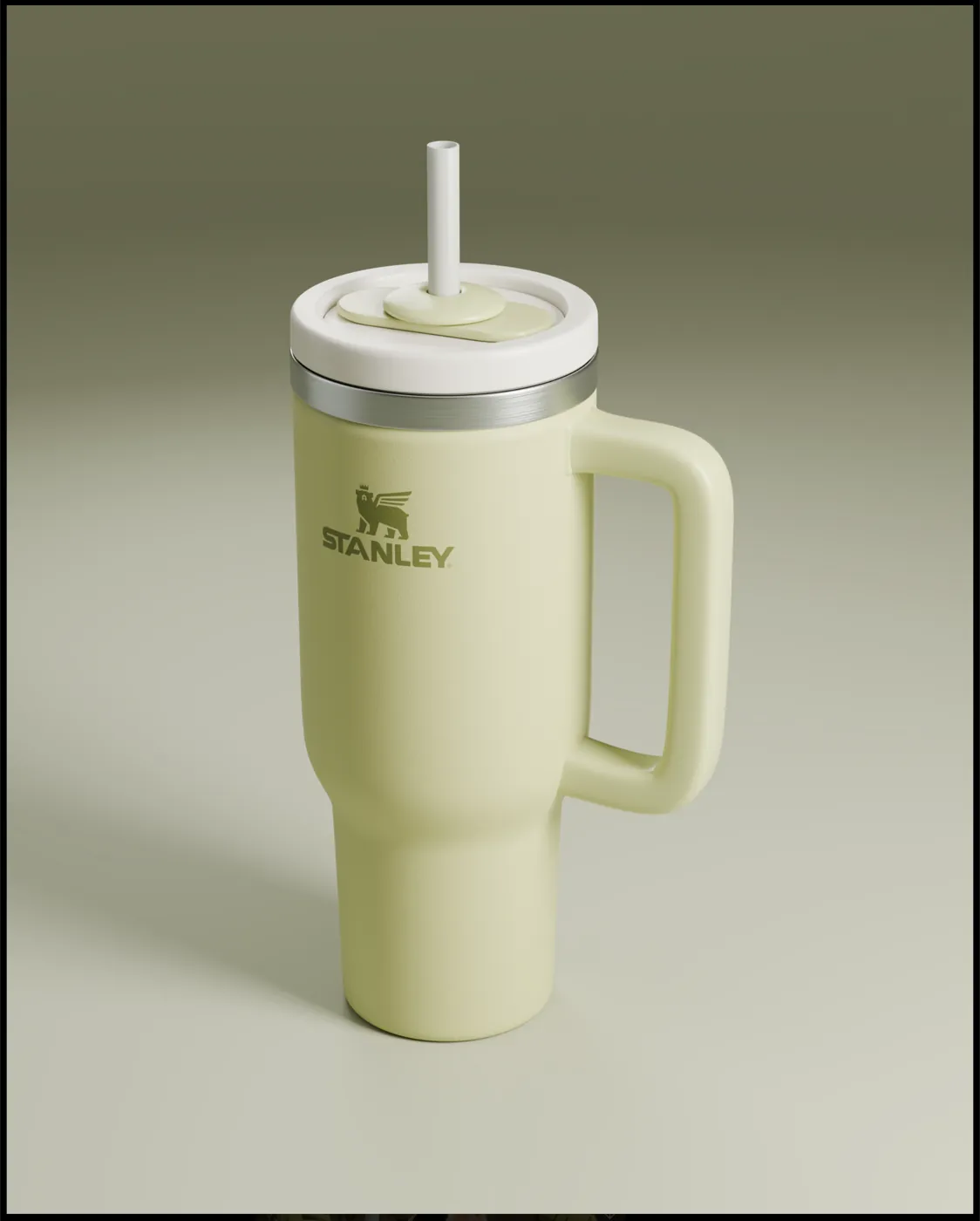
The final render came out with the logo applied and the pistachio color that became the palette for everything that followed. I saved more than one view of the tumbler; they go in as references in the next stages.
Step 2: the reference before any prompt
A prompt without a reference is a lottery. Before asking for any image, I went to Pinterest looking for a composition that already solved the art direction problem: a person in the foreground, product in hand, velvety 3D typography orbiting the body. I found a piece signed by @atachkina, from the Design Touch studio, with the phrase Summer Time in fuzzy letters over a tennis court.
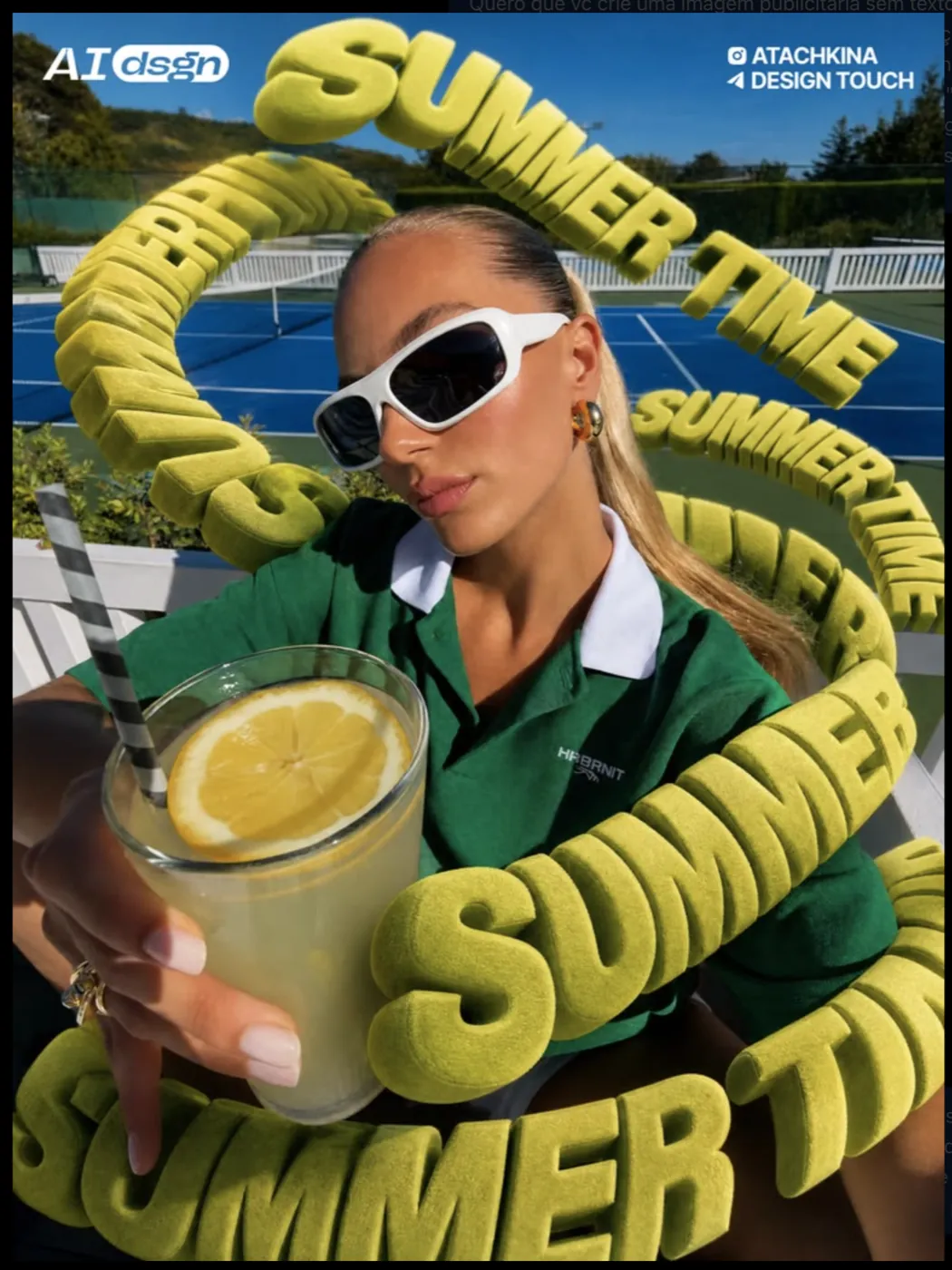
The reference is not copied; it is the yardstick. It decides the pose, the lens, the position of the letters and the mood. That is the design decision that comes before the tool: without it, each generation round pulls in a different direction, and you spend credits searching for a direction that should have been set before you opened any model.
Step 3: how do you generate the base image in ChatGPT?
The base image comes out of ChatGPT's image generator, which gets three things: the Pinterest reference, the tumbler renders and a prompt in Portuguese that describes the scene and locks what cannot change. The first version is rarely the final one; the following rounds fix scale, color and anatomy, ideally one fix at a time.
First round: the whole scene in one prompt
This was the first prompt, pasted without edits:
I want you to create an ad image with no text, only the stylized 3d phrase, of a person in the same position as this woman, holding the green Stanley cup, showing the brand to the camera and this 3d font around her with the phrase "Stanley Time" with the exact same effect and texture as the font in the original image, the colors of the clothes and the sunglasses should be very close to the pistachio green of the bottle
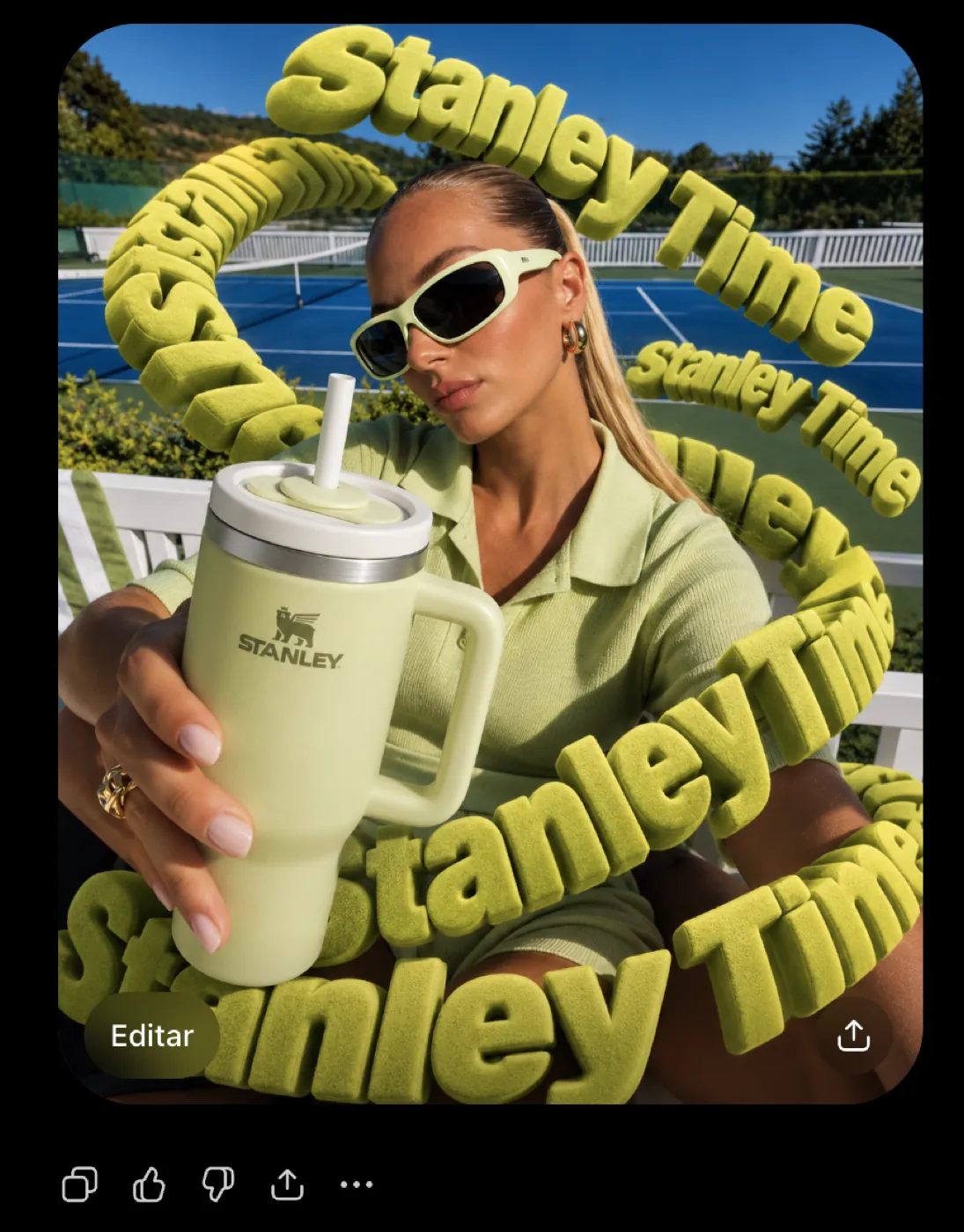
The first version got the pose and the typography right and missed the rest: a blue court, a small tumbler, mixed-case letters.
Second round: scale, background and palette
The second prompt fixes three things at once, and two of them work:
The fonts should all be in uppercase, the stanley cup is 28 cm and should be bigger than you made it. change the background color to a clay tennis court and a bit more green in the background, I want the image to be almost monochromatic pistachio tones (90%)
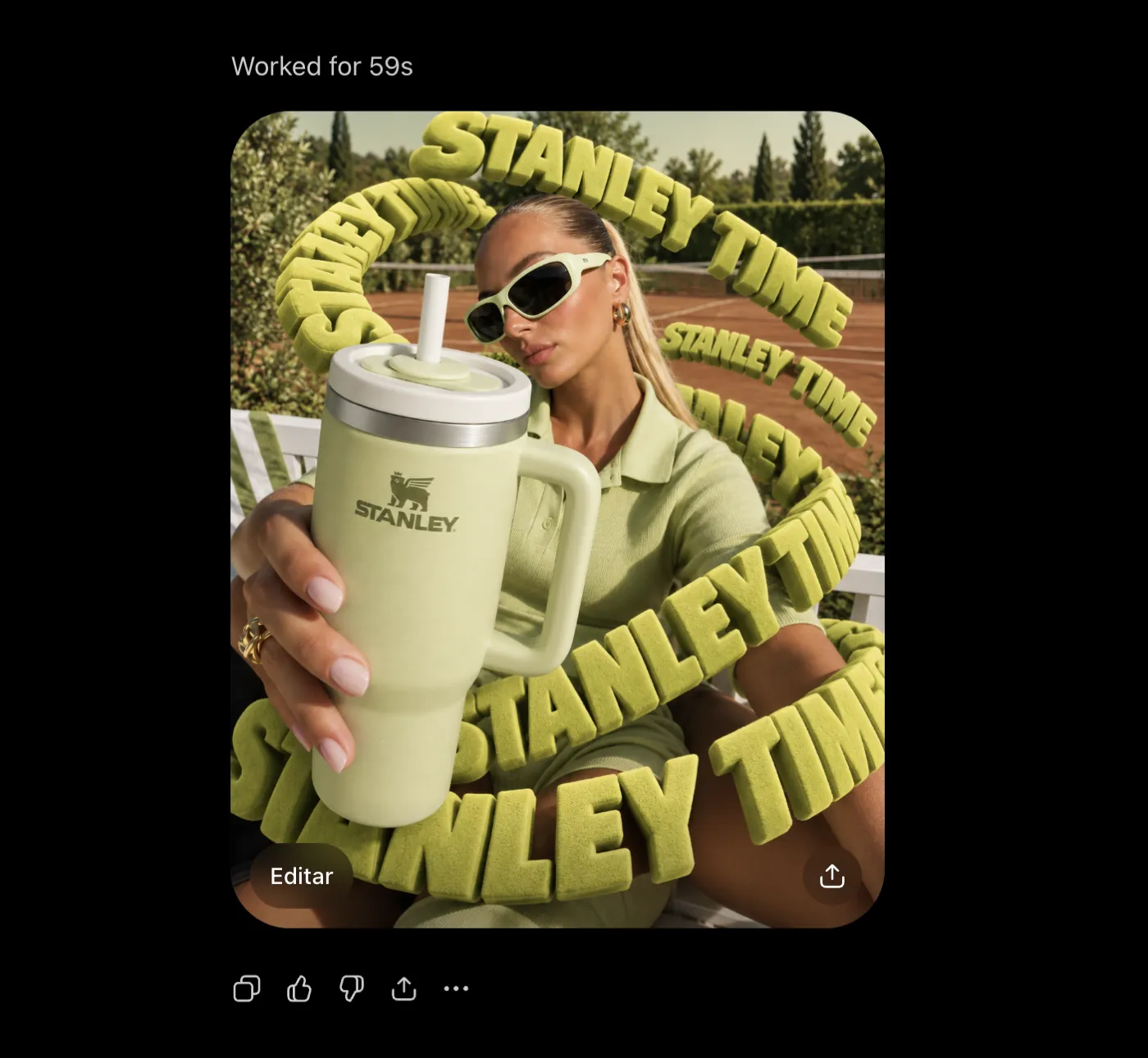
Notice the detail that changes everything: the tumbler is 28 centimeters tall. Giving the real size of the product is what makes the model respect its scale relative to the body. The second version got the clay and the palette right, but still missed the size, and it created extra limbs.
Third round: anatomy and real size
The third prompt is pure correction, and it is the one that closes the image:
the cup needs to be 30% bigger it is still small and not at real size. you need to pay attention to the girl's body, she needs to have 2 legs and a slightly short skirt, nothing sensual since the words will cover it. just be careful not to create several legs and several arms like in the last image you created
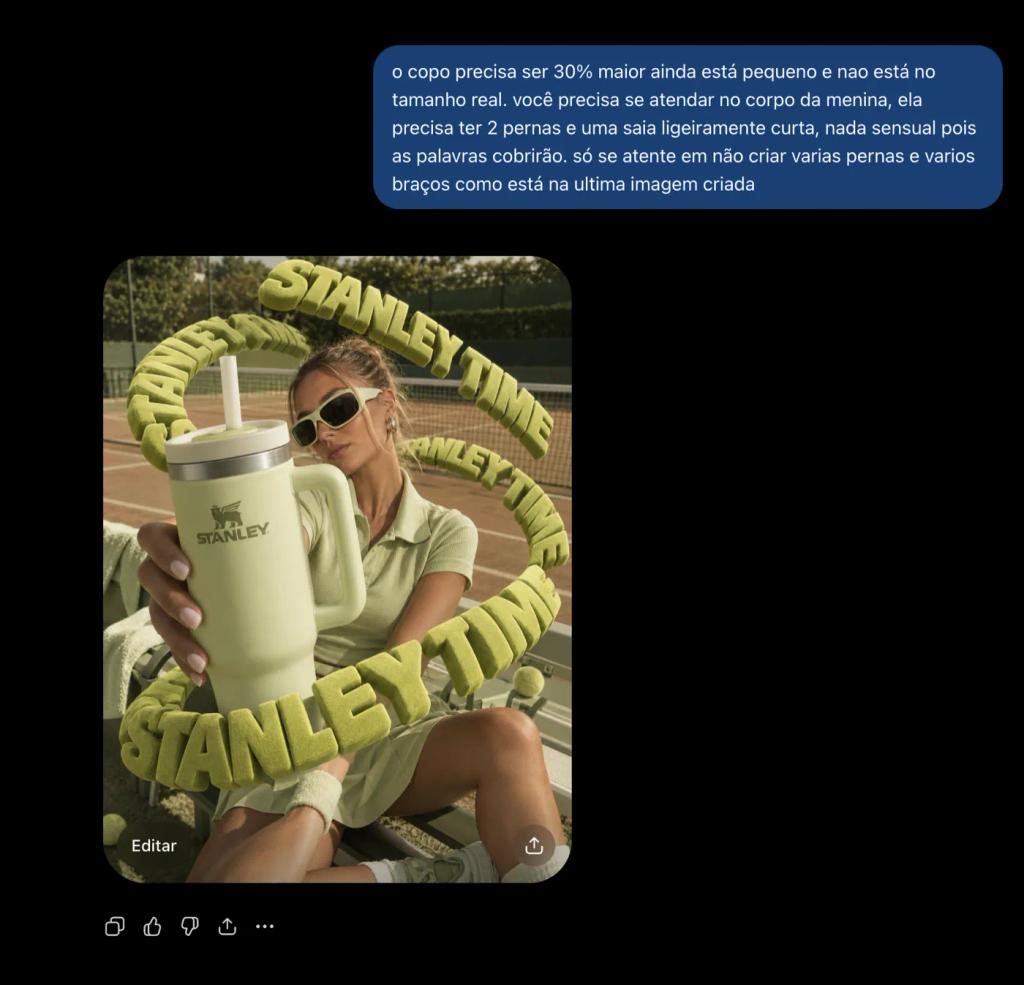
The third version is the one that went into the video. Total cost of this stage: less than 1% of the Pro plan quota, even with all the touch-up rounds. Generating images in ChatGPT is cheap; what is expensive is not knowing what to ask for.
Step 4: how do you turn the image into video with Seedance 2.5?
The image becomes video in Higgsfield, with Seedance 2.5 in image-to-video mode: you upload the base image, write a prompt describing action and camera, choose duration, resolution and aspect ratio, and the model generates the clip with audio. The Stanley Time take came out at 15 seconds, 1080p, 3:4 aspect ratio and audio on.
According to Higgsfield's page on Seedance 2.5, published on August 6, 2026, the ByteDance model generates up to 30 seconds per clip, in 480p, 720p or 1080p, with ambience, foley and music created in the same pass as the video. The same page lists 90 credits for 10 seconds at 1080p, which explains the 135 credits for the 15-second take.
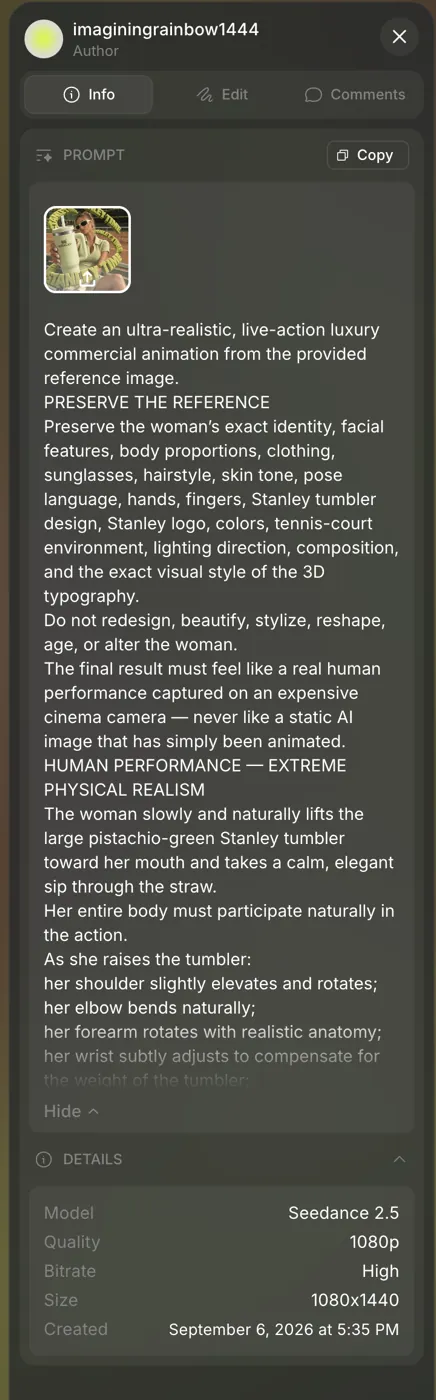
If you want to reproduce the workflow, the account is the same one I use: create your Higgsfield account and look for Seedance 2.5 in the video tab. The Higgsfield links in this article are affiliate links: if you subscribe through them, Wama earns a commission at no extra cost to you.
The video prompt is long, in English, and is transcribed in full in the next section. Its logic fits in one sentence: describe the physics before the aesthetics. The weight of the tumbler in the hand, breathing, hair reacting to the wind, the shadow under the chin changing as the head moves, 3D letters passing in front of and behind the body with correct occlusion. Aesthetics without physics becomes a still image that moves.
Two 15-second takes came out of this prompt, at 135 credits each. One was discarded; the other moved on to the upscale. Before them, on the same day, I tested a 10-second horizontal take and a product-only commercial, made from the Blender renders. Both stayed in the archive.
Anatomy of the Seedance prompt, block by block
The prompt below is the one that generated the final take, transcribed in full. The em dashes in the original were replaced with commas and colons; nothing else changed. Each block has a short note on what it solves.
Preserve the reference
First, what cannot change. Identity, clothing, product, setting and typography go in as a fixed clause before any action verb.
Create an ultra-realistic, live-action luxury commercial animation from the provided reference image.
PRESERVE THE REFERENCE
Preserve the woman’s exact identity, facial features, body proportions, clothing, sunglasses, hairstyle, skin tone, pose language, hands, fingers, Stanley tumbler design, Stanley logo, colors, tennis-court environment, lighting direction, composition, and the exact visual style of the 3D typography.
Do not redesign, beautify, stylize, reshape, age, or alter the woman.
The final result must feel like a real human performance captured on an expensive cinema camera, never like a static AI image that has simply been animated.
Human performance
There is only one action: raise the tumbler and drink. The block describes the chain of muscles and the body's counterweight, because an isolated arm moving is the most common mistake in animated images.
HUMAN PERFORMANCE: EXTREME PHYSICAL REALISM
The woman slowly and naturally lifts the large pistachio-green Stanley tumbler toward her mouth and takes a calm, elegant sip through the straw.
Her entire body must participate naturally in the action.
As she raises the tumbler:
her shoulder slightly elevates and rotates;
her elbow bends naturally;
her forearm rotates with realistic anatomy;
her wrist subtly adjusts to compensate for the weight of the tumbler;
her fingers maintain believable grip pressure around the cup;
her torso subtly shifts its center of gravity;
her upper body leans forward by a few degrees;
her opposite shoulder naturally counterbalances the movement.
There must be continuous, subtle secondary motion throughout the body rather than isolated arm animation.
Her chest, clothing and upper torso should respond very subtly to gravity, breathing and body acceleration, with physically believable soft-tissue inertia. Keep this extremely natural and restrained, no unnatural deformation.
Face, mouth and the sip
The sip is the moment when the video either convinces or gives away that it is AI. That is why the description is muscular and small: cheek, jaw, throat.
FACE, MOUTH AND DRINKING REALISM
The drinking action must be anatomically convincing.
When her lips make contact with the straw:
the lips gently close around it;
the corners of the mouth subtly contract;
the jaw slightly changes position;
the muscles around the mouth activate;
the cheeks very subtly draw inward from suction;
the area beside the nose and upper lip shows tiny muscular changes;
the skin around the mouth compresses naturally against the straw.
The cheeks must never collapse dramatically. The effect should be barely perceptible but realistic enough to communicate that she is actively drawing liquid through the straw.
During the sip, include tiny natural facial micro-movements:
subtle cheek tension;
minimal jaw movement;
slight movement of the chin;
tiny changes in nasolabial folds;
microscopic skin compression around the mouth;
natural movement of the lower face;
very subtle tension in the neck muscles.
After drinking, create a small realistic swallowing motion:
tiny movement around the throat;
subtle larynx movement;
slight relaxation of the cheeks and lips;
a nearly imperceptible exhale afterward.
Never freeze the face.
Even while remaining elegant and composed, her face must constantly exhibit tiny living micro-movements.
Head, neck and breathing
Head and neck follow the sip, and the shadow under the chin has to react to the sun. Breathing is continuous and almost invisible.
HEAD, NECK AND POSTURE
As she drinks, her head tilts naturally by a few degrees to meet the straw.
The neck bends and rotates anatomically with the head.
The chin position changes naturally during the movement.
Create realistic compression and stretching of the skin between the jawline, chin and neck.
A physically accurate soft shadow must form beneath her chin and jaw as her head position changes.
The shadow must dynamically respond to the sun direction and her motion rather than remaining painted onto the image.
BREATHING
Introduce very subtle breathing throughout the entire shot.
The upper chest, ribcage and shoulders should rise and fall almost imperceptibly.
The breathing must be visible only as natural human secondary motion, never exaggerated.
Her breathing should continue even while drinking, with a brief natural pause during the main sip followed by a soft release afterward.
Hair, skin and fabric
Three materials that give away synthetic video when they stay rigid: hair, skin and fabric. Each one gets inertia rules and a list of what must not happen.
HAIR PHYSICS
Her hair must never behave like a rigid object.
Individual strands and small groups of hair should respond naturally to:
head rotation;
body movement;
inertia;
gravity;
a very soft outdoor breeze.
When she slightly tilts or moves her head, loose strands should lag behind by a fraction of a second and then settle naturally.
Add extremely subtle random strand movement caused by the environment.
Hair must maintain its original haircut, volume, color and styling.
No morphing hairstyle, no disappearing hair, no artificial liquid-like movement.
SKIN REALISM
Skin must behave like real human skin under natural sunlight.
Preserve:
pores;
peach fuzz;
subtle skin translucency;
natural variations in skin tone;
tiny facial texture;
realistic specular response;
subtle subsurface scattering.
As facial muscles move, skin texture must remain attached to the anatomy rather than sliding or morphing.
Avoid plastic CGI skin, excessive smoothing or beauty-filter appearance.
CLOTHING AND SOFT-TISSUE PHYSICS
Fabric must react naturally to movement.
Create subtle fabric tension and relaxation around:
shoulders;
upper torso;
waist;
hips;
arms.
The fabric should slightly stretch, fold and settle as her posture changes.
Her body should display extremely subtle physically believable soft-tissue secondary motion caused purely by gravity, breathing and momentum.
Keep everything tasteful, restrained and realistic.
Light and shadow
Contact shadows change with posture; flat lighting on the face is forbidden. This is the block that keeps the scene from looking like a cutout pasted over a background.
LIGHTING AND SHADOW INTERACTION
Lighting must behave dynamically as her body moves.
Create realistic contact shadows and self-shadowing:
beneath the chin;
beneath the jaw;
between the neck and shoulders;
beneath the chest and natural clothing folds;
beneath the arms;
between the hand and Stanley tumbler;
beneath the tumbler when it approaches the body.
These shadows should shift naturally as her posture changes.
Maintain premium golden outdoor sunlight with believable directional light, soft fill from the environment and realistic global illumination.
Avoid flat facial lighting.
The face should retain dimensionality with gentle light falloff across the cheeks, jaw and neck.
The tumbler as a rigid object
The product is the hero and, at the same time, the weakest point: a melting tumbler, a disappearing handle and a changing logo are the classic flaws of generated video. Everything becomes an explicit prohibition.
STANLEY TUMBLER: ABSOLUTE GEOMETRIC CONSISTENCY
The Stanley tumbler is a hero product.
It must remain perfectly solid, rigid and geometrically consistent during the entire shot.
Preserve exactly:
tumbler shape;
dimensions;
handle;
lid;
straw;
Stanley branding;
material;
pistachio-green color.
No morphing.
No bending.
No shrinking.
No stretching.
No geometry changes.
No disappearing handle.
No duplicated straw.
No changing logo.
The Stanley logo must stay correctly positioned and readable whenever physically visible to the camera.
The tumbler should feel like a real weighted object.
Her hand and wrist must react to its weight.
Create physically accurate finger contact with the surface and realistic occlusion between fingers, handle and cup.
The straw remains rigid enough to behave like a real Stanley straw while maintaining realistic material properties.
3D typography
The letters have mass, pass in front of and behind the body, and the occlusion has to be correct. What the previous block did for the tumbler, this one does for the typography.
3D TYPOGRAPHY: “STANLEY TIME”
At the same time, the large 3D words:
“STANLEY TIME”
slowly orbit around the woman in three-dimensional space.
Preserve exactly:
spelling;
font;
character proportions;
extrusion depth;
material;
pistachio color;
fuzzy velvet-like texture.
The letters behave like real solid objects with mass and depth.
Their motion follows elegant, smooth curved trajectories around the subject.
Different letters can travel with slightly different timing to produce dimensional parallax while remaining visually coordinated as one composition.
The letters must naturally pass both in front of and behind the woman.
Occlusion must be physically correct.
When a letter passes behind her:
the body must completely occlude the hidden portion.
When a letter passes in front:
it must cast believable subtle shadows and ambient occlusion where appropriate.
Never allow letters to:
melt;
deform;
change spelling;
duplicate;
disappear;
intersect unnaturally with her anatomy;
change font;
flatten into 2D graphics.
Camera, focus and motion blur
A cinema camera, a 50 mm lens, a slow dolly-in with a 5-degree orbit and a focus pull the way a camera assistant would do it. The motion blur is physical, never decorative.
CAMERA
Premium cinematic advertising photography.
Camera system:
ARRI Alexa 35 aesthetic.
Lens:
high-end cinema prime lens around 50mm.
Movement:
begin with a very slow cinematic dolly-in while simultaneously performing an extremely gentle lateral orbit of approximately 5 degrees around the woman.
Add almost imperceptible heavy-camera micro-movement, similar to a real stabilized cinema rig operated by a human.
The camera must feel alive but expensive and controlled.
No obvious digital stabilization.
No robotic path.
No aggressive handheld shake.
Use realistic lens perspective.
Maintain the woman, her face and the Stanley tumbler as the hero subjects.
DEPTH OF FIELD
Use shallow but controlled cinematic depth of field.
Prioritize focus on:
the woman’s face;
her lips and straw during the drinking action;
the Stanley tumbler;
the nearest portions of the 3D typography.
The clay tennis court, distant foliage and background elements should fall naturally out of focus according to their physical distance from the focal plane.
Focus transitions should feel like an experienced 1st AC performing a subtle cinema focus pull.
Do not create artificial portrait-mode edge blur.
MOTION BLUR
Use physically plausible cinema motion blur.
Motion blur should appear naturally on:
moving hair strands;
hand motion;
tumbler movement;
orbiting letters;
subtle camera movement.
The woman’s facial features must remain readable and stable.
Do not smear the eyes, lips, fingers or Stanley logo.
Environment and image quality
The environment is preserved with discreet life, plus a long list of image qualities: pores, reflections, contact shadows, dynamic range. The final paragraph sets the reference: a high-budget sportswear brand commercial.
ENVIRONMENT
Maintain the original tennis-court environment.
Preserve:
clay court;
pistachio-green visual direction;
surrounding vegetation;
small amount of blue sky;
realistic outdoor atmosphere.
Add subtle environmental life:
extremely gentle foliage movement;
tiny breeze interaction;
natural variation in sunlight;
realistic atmospheric depth.
Do not introduce new objects or people.
CINEMATIC IMAGE QUALITY
The final animation must have:
hyper-realistic human skin,
visible pores,
peach fuzz,
realistic hair strands,
realistic fingernails,
correct anatomy,
physically accurate fabric,
natural soft-tissue motion,
realistic reflections,
accurate contact shadows,
subsurface scattering,
global illumination,
cinematic highlight roll-off,
realistic motion blur,
natural depth of field,
extremely high micro-detail,
premium commercial color science,
high dynamic range,
clean highlights,
rich but natural shadows.
Visual reference:
high-budget luxury sportswear commercial + premium Stanley product advertising + fashion editorial cinematography.
4K cinematic master quality.
The shot must look as if a real actress, real Stanley tumbler, real physical typography and real tennis location were filmed together practically with an ARRI Alexa 35.
What to avoid
The negative list is as long as the positive one. It closes with the priority that governs the whole prompt: human physical believability.
ABSOLUTELY AVOID
AI-like facial morphing.
Frozen facial expressions.
Rigid hair.
Floating hair.
Rubber-like skin.
Plastic skin.
Beauty-filter skin.
Face identity changes.
Eye deformation.
Lip deformation.
Cheek deformation.
Overdone cheek suction.
Exaggerated body physics.
Exaggerated chest motion.
Body warping.
Breast or torso deformation.
Extra limbs.
Extra arms.
Extra hands.
Extra legs.
Extra fingers.
Missing fingers.
Fused fingers.
Changing hand anatomy.
Cup deformation.
Cup resizing.
Cup morphing.
Logo deformation.
Logo disappearance.
Straw duplication.
Changing tumbler geometry.
Typography morphing.
Misspelled text.
Melting letters.
Unnatural object intersections.
Static shadows attached to the original image.
Fake CGI lighting.
Robotic body movement.
Robotic camera movement.
Excessive slow motion.
Artificial digital sharpness.
Overprocessed HDR.
Every movement should contain subtle acceleration, deceleration, inertia, weight, muscle response and secondary motion.
Nothing should move independently without a physical cause.
The strongest priority is HUMAN PHYSICAL BELIEVABILITY.
It must feel observed rather than animated.
The viewer should believe this was captured as a real live-action Stanley commercial.
Step 5: the 4K upscale with Topaz Video
Seedance delivers 1080p, Instagram compresses, and the result on a phone loses skin texture and sharpness in the letters. The upscale is there to arrive with room to spare: the chosen take went through Topaz Video inside Higgsfield itself and went from 1080 by 1440 to 2880 by 3840 pixels, for 51 credits.
The integration comes from a 2025 partnership: according to PetaPixel's coverage from August 6, 2025, Higgsfield began offering Topaz Labs video upscaling to 2K and 4K right in the browser, with different models for faces, texture and stylized content. For a single person, that removes an entire stage of installed software.
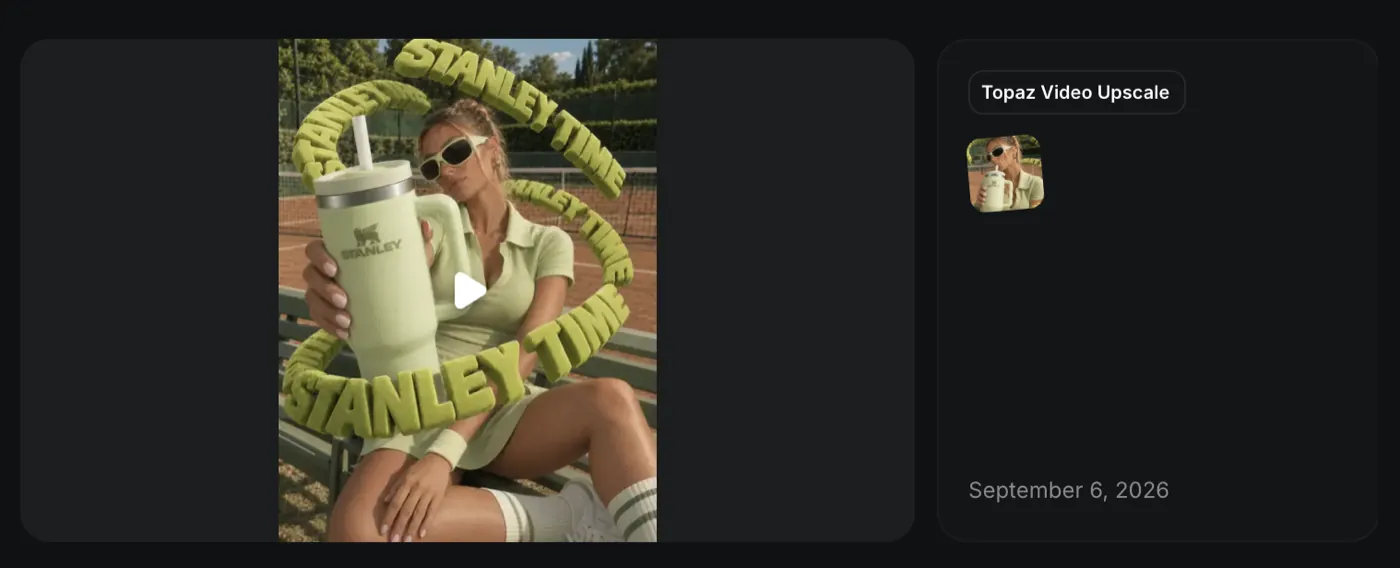
It is the same finishing logic I apply when I present a digital product on video: the piece has to arrive with quality to spare where it will be seen, because the platform is going to compress it. The upscale is on the same account: try Higgsfield's video upscale with a clip of your own before deciding whether it is worth it for your product.
How much does an AI video ad cost?
The Stanley Time video cost 186 Higgsfield credits for the take that went live: 135 for Seedance 2.5 and 51 for Topaz Video, about US$ 9 at the rate of US$ 0.05 per credit that Higgsfield itself uses on the model page. Adding the 3D model and the images, ChatGPT usage came to about 12% of the Pro plan's monthly quota. Not counting the hours of the person directing.
Stage | Tool | What it consumed |
|---|---|---|
3D model of the tumbler | GPT-6 Astra operating Blender | about 11% of the ChatGPT Pro plan's monthly quota |
Visual reference | zero | |
Base image, three rounds | ChatGPT, image generator | less than 1% of the monthly quota |
15-second video at 1080p | Higgsfield, Seedance 2.5 | 135 credits per take |
Upscale to 2880 by 3840 | Higgsfield, Topaz Video | 51 credits |
Higgsfield total, final take and upscale | 186 credits, about US$ 9 |
The math including what was discarded
The honest math includes what was discarded. Counting the takes from the same day that never went live, two 10-second ones and a second 15-second take, usage on Higgsfield rises to 501 credits, close to US$ 25. The account log shows the first take at 4:36 p.m. and the upscale at 7:56 p.m. on September 6, 2026.
What the table doesn't show is the stage that weighs the most: direction. Choosing the reference, knowing the tumbler is 28 centimeters tall, noticing the model grew an extra leg, deciding the palette is 90% pistachio. That is the work, and it is what separates a campaign video from a generated clip. It is the same standard I use with AI in development: the tool handles the repetitive part, the person answers for the decision. And it is the same yardstick I use to explain how much a professional website costs: the value is in the decision, not the tool.
If your question is whether this cost pays off for your product, the cheapest way is to run the numbers with a real clip: see Higgsfield's plans, generate 10 seconds at 720p and compare it with the budget for a day of production.
Mistakes that cost credits
Each item below cost credits or a round in this project. They are listed in the order they came up.
Not giving the product's size. The tumbler came out small twice. It only respected the scale when the prompt said 28 centimeters and asked for 30% more.
Fixing several things in the same round. Uppercase, background and palette together worked; size and anatomy together did not. One fix per round is cheaper than it looks.
Leaving the color loose. Until the palette was set at 90% monochromatic pistachio, each version drifted toward a different green.
Animating before approving the image. The image costs almost nothing; the video take costs 135 credits. Every anatomy flaw that makes it into the video gets animated for 15 seconds.
Not locking the product geometry in the video prompt. Without the consistency block, the tumbler melts, the handle disappears and the logo changes. Half the prompt exists to prevent that.
Generating straight in 1080p with audio. Higgsfield's help center recommends iterating in 720p and turning audio on only for the final pass. I ignored it and paid for two 15-second takes in 1080p.
Upscaling a take that wasn't approved. Those 51 credits are only worth it on the final take. Approve at 1080p, then upscale.
Before spending your first credit, it is worth keeping this list open next to you: open your Higgsfield account and start with a short, cheap clip, just to see how your product behaves in motion.
What does this change for a brand?
For a brand, an AI video ad changes the cost of experimenting, not the need for direction. A test piece that used to require a set, a model and a production company now comes out of one desk with one person and a few dozen dollars in credits. What is still expensive is getting it right: reference, scale, color, anatomy and the judgment to throw out what doesn't work.
There are limits a brand needs to know before commissioning one. A generated model's identity is not a hired face, and consistency across pieces takes care. A third party's trademark, like Stanley in this study, cannot go to market without permission. And the video is only the piece: it needs a place to work, which is almost always the page where that video will convert or a profile the brand keeps up consistently.
At Wama, this workflow fits in the same place AI already fits in our process: speeding up production without taking the decision off the table. I show this in agencies that already use AI to build websites and in what Wama delivers as a Framer agency. The product video, the website and the brand identity are parts of the same project, and the direction that made the tumbler 28 centimeters tall is the same direction that decides what goes on the home page.
The finished video goes into the same pipeline that publishes everything else: post automation with Zernio takes each piece to social media at the right time, after approval.
Frequently asked questions
Do I need to know Blender to make a video like this?
Not to get started. GPT-6 Astra built the tumbler inside Blender from the prompt; what I did was review the proportions and the render. Knowing the basics helps you fix things fast, and it is what keeps you from accepting a crooked model because you can't see the mistake. Without a 3D product, a good photo of the product also works as a reference.
Is Higgsfield paid? How much does it cost to generate a video?
Higgsfield works with credits included in monthly plans. According to the official Seedance 2.5 page, 10 seconds at 1080p cost 90 credits, and the 15-second take in this article cost 135. The Topaz upscale cost 51. The price shows up before you confirm each generation, and you can test with a short clip on Higgsfield without surprises.
Does Seedance 2.5 generate audio along with the video?
It does. According to Higgsfield's page on the model, Seedance 2.5 creates ambience, foley and music in the same pass in which it generates the image, in clips of up to 30 seconds. In Stanley Time the audio was on for the final take. To iterate cheaply, Higgsfield's recommendation is to generate at 720p and turn audio on only for the final pass.
Can I use the brand of a product that isn't mine in an AI video?
For study and portfolio use, clearly labeled as unofficial, that is what I did here. To run it as an ad, no: the trademark, logo and product design belong to the brand owner, and commercial use requires permission. If the product is yours, the same workflow applies without that restriction. This is not legal advice.
How long does it take to make an AI video ad?
The video part fit into one afternoon: my Higgsfield account log shows the first take at 4:36 p.m. and the upscale at 7:56 p.m. on September 6, 2026. The 3D model and the image rounds came before that. The time that doesn't show up in any log is the time spent looking at each version and deciding what to fix.
A generated video shows the product; what sustains the brand is the whole set: website, identity and assets with the same direction. At Wama, I design and build that end to end, from design to launch, with AI where it speeds things up and judgment where it doesn't get to decide. If your brand needs a website that lives up to what you are going to show on it, see Wama's work.